Appearance
Results and reports
When an upgrade job ends, its page keeps the result: which devices were upgraded, which failed or were rolled back, and why. You can download the result as a job report, plan the devices that were not upgraded, and see the outcomes in Cloud, on the dashboard and on each device's page.
Open a finished job
- At the orchestrator, open Upgrade jobs.
- Open the History tab.
- Select the job.
The job page opens on the Execution tab. A finished job's page looks like a running one (see Monitoring a running job), but nothing updates any more: "The rollout isn't active, so this table no longer updates automatically." Finding jobs in the list is covered in Upgrade jobs.
The result notice
The notice under the header states the result and the way forward.
| Notice | Job status | Meaning |
|---|---|---|
| Upgrade completed | Succeeded | "Upgrade completed on 12 devices. All verification checks passed." |
| Upgrade finished with failures | Failed | Names the failed devices and how they failed, for example "{devices} failed verification. 10 of 12 devices upgraded." With rollbacks: "Rolled back: 1." |
| Rolled back | Rolled back | "{devices} were rolled back and are back on their previous firmware." |
| Rolled back automatically | Rolled back | The orchestrator rolled the devices back by itself |
| "4 upgraded, 1 rolled back" | Partly rolled back | Some devices upgraded, others rolled back. "The upgraded devices keep the new firmware." |
| Closed without rollback | Failed | "Rollback declined by {name}: {reason}" |
| Rollout cancelled | Cancelled | "No more devices will be upgraded. Devices that finished before the cancellation (4) keep the new firmware." |
| Cancelled before the first batch | Cancelled | "The rollout was cancelled before any device started. Nothing on the devices was changed." |
| No device was upgraded | Not run | No firmware was staged before the maintenance window |
How the failed devices failed reads as one of: "failed", "failed verification", "failed activation", "failed the firmware transfer", "failed before any change was made".
The failed and rolled-back devices are named in the notice; select a name to open that device's upgrade timeline.
Per-device outcomes
The Device phases table keeps every device's final phase, firmware change, upgrade time, attempt and reason. To see only one outcome:
- Open Filter by result.
- Choose an outcome, for example Failed (2) or Rolled back (1).
Each device's Upgrade timeline keeps every step with its times and result. Outcome and phase meanings are in Statuses.
When clean-up of inactive packages failed on a device, the table says Inactive package removal failed. The upgrade succeeded; remove the packages from the Pre-checks tab of the next job.
Export the job report
The job report is a CSV file of every device of the job, whatever the table is filtered to. You can export it at any time, also while the job runs.
On the Execution tab, select Export job report.
The button reads Preparing report… while it reads the devices.
Save the file.
The page confirms Job report downloaded: "Exported 12 devices to {file}." The file is named after the job and the time, for example
upgrade-job-access-switches-….csv.
If it fails: "The report could not be created. Try again."
| Column | What it holds |
|---|---|
| Job, Job ID, Plan ID | The job and the plan it ran |
| Job state when read | The job's status when the report was made |
| Report read at (UTC) | When the report was read |
| Device, Device ID | The device |
| Ring, Batch | Where the device ran |
| Result | The device's outcome, for example Succeeded, Failed, Rolled back, Not run |
| Phase detail | The device's phase |
| Reason | The reason, as on the page |
| Package | The device's package |
| Firmware before, Firmware before (exact build) | What it ran before |
| Target firmware, Target firmware (exact build) | What the job installed |
| Firmware after, Firmware after (exact build) | What it runs now. "Not confirmed" when nobody confirmed it; "{version} (not committed)" for uncommitted firmware |
| Upgrade started (UTC), Upgrade ended (UTC), Upgrade time (seconds) | The upgrade's times |
| Rolled back at (UTC), Rolled back by | When and by whom: the operator's name, "An operator", "Orchestrator (automatic rollback)" or "Device itself (commit window ended)" |
| Attempt | Which attempt of the upgrade |
| Firmware change | From which version to which |
| Firmware note | What the device runs when it is uncommitted |
Times in the report are in UTC.
Plan the devices that were not upgraded
A closed job never runs again. When it did not upgrade every device, its notice says so, for example "3 devices were not upgraded: {devices}." or "2 devices are not on the target firmware: 1 rolled back, 1 not upgraded.", and how to go on: "This job is closed and will not run them. Plan a new job for them; its pre-checks read each device again."
If you can plan jobs (Network operator or Orchestrator administrator):
Select Plan a new job for these devices.
The upgrade wizard opens with those devices and the job's strategy filled in. Planning is covered in Planning an upgrade.
If a draft for these devices already exists: "A draft for the remaining devices already exists: {name}." Select Open that draft, or Plan another.
INFO
Devices that failed in this job are proposed too. "1 of them failed in this job: check it before planning, because the new job's pre-checks warn about it." A device whose rollback failed or whose state is unknown stays out of a new plan until you have checked it. A device that runs uncommitted firmware can be planned only once new jobs are no longer blocked for it.
Imported jobs
A job imported from an earlier system shows Imported · Read-only and Imported from an earlier system: "These facts describe the original job. This record can't run upgrades and has no current plan, pre-checks, or rollout." Its Original job table lists the preserved facts: State, Phase, Progress, Devices, Pre-check status, Pre-check findings, Rollout batches, Rollout waves, Last updated and Imported.
The job in Cloud
Cloud keeps a read-only copy of every job of every orchestrator.
- In Cloud, open Upgrade jobs.
- Select the job. In the list of every orchestrator, the Orchestrator column says where it ran.
The page states "Published by the orchestrator {time}": the time of the copy you are looking at.
| Section | What it shows |
|---|---|
| Job summary | Package, scope, rollout plan, auto-stop, rollback mode, planned start, approval, pre-checks and Devices by state, for example "10 succeeded", "1 failed", "1 rolled back" |
| Execution | The final status, how it was run (Driver run, VIRTUAL NETWORK DEVICE, SIMULATED), "Updated {time}", the cancellation notice when cancelled, and the Execution completion bar |
| Device progress | Each device's Firmware change, State, Upgrade time, Wave / batch and Reason. Select a device name to open its device page |
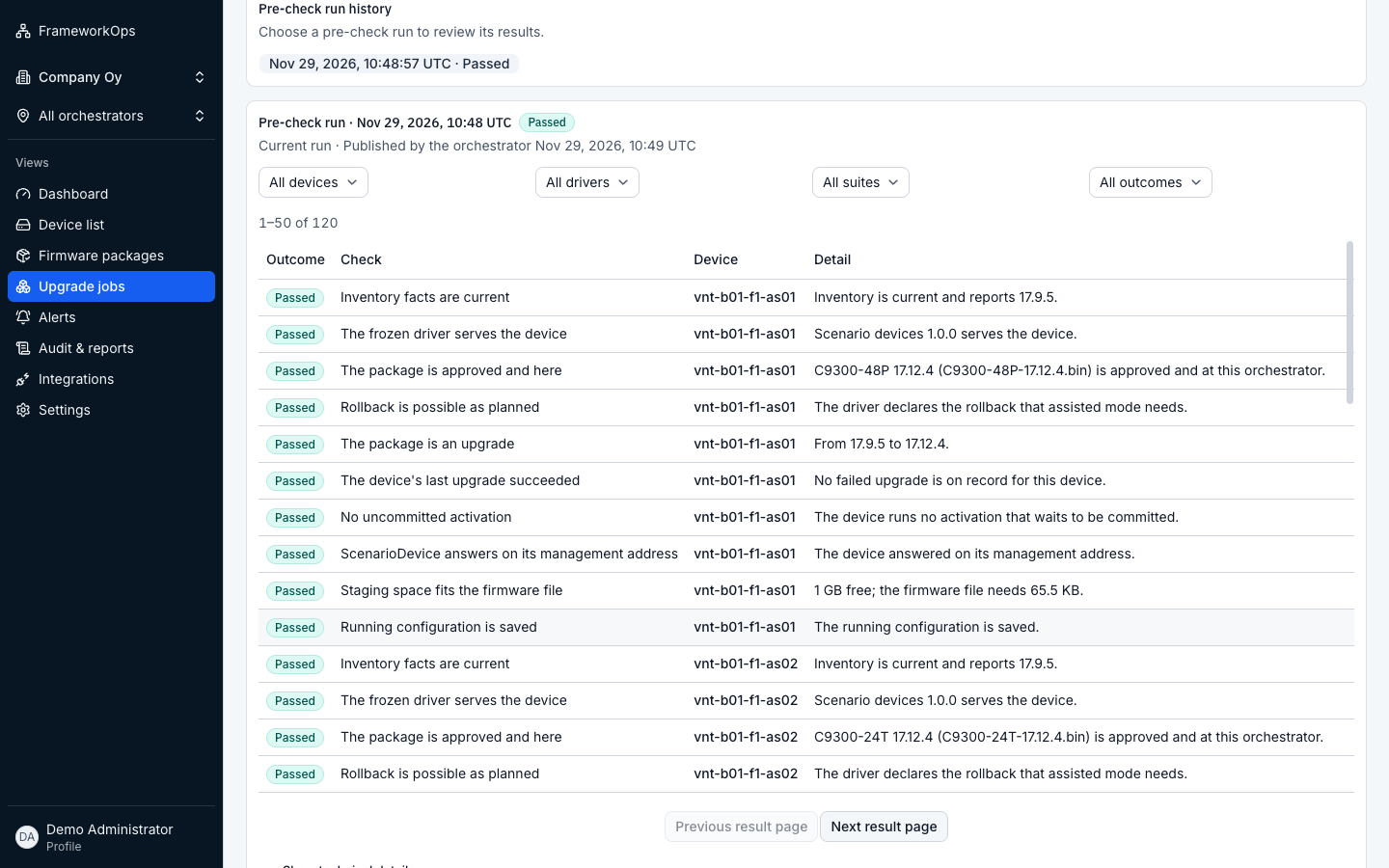
| Pre-check run history | "Choose a pre-check run to review its results." Select a run; More runs loads older ones |
| Pre-check run · {time} | The selected run's results with filters for Device, Driver, Suite and Outcome, marked Current run or Out-of-date run |
- Refresh evidence reads the job again from Cloud: "Evidence read again from Cloud." It does not fetch anything from the orchestrator.
- Open on the orchestrator opens the job's page at its orchestrator in a new tab. It is offered only when your roles give you access at orchestrators.
If the job's latest pre-check results have not reached Cloud yet: Pre-check results are not copied from the orchestrator yet, "The orchestrator sends them with its next sync. Refresh evidence reads them again; the orchestrator's own job page has them now."
If you cannot open upgrade jobs in Cloud: No access to upgrade jobs, "Your role cannot view upgrade jobs. Ask an organization administrator for access."
Outcomes on the dashboard
The Dashboard, in Cloud and at the orchestrator, shows upgrade results in three places.
| Place | What it shows |
|---|---|
| Failed upgrades metric | "Failed or stopped on a failed device (last 30 days)", counted by each device's latest attempt in 30 days, with rolled-back, skipped and cancelled devices named beside it |
| Upgrade work table | Jobs that need a decision first, then running and awaiting launch jobs, and jobs that failed or rolled back in the last 30 days, with Wave and Progress (for example "8 of 12 upgraded", "1 failed", "1 rolled back"). All upgrade jobs opens the job list |
| Upgrade outcomes | "Which devices the drivers upgraded, from which firmware to which, and which they did not." One row per Driver, Model and Version change, with Succeeded, Failed, Rolled back, Skipped and Commonest stop (the step where most failed: Reading firmware, Pre-checks, Firmware transfer, Activation, Verification, Commit or Rollback) |
Devices that failed and wait for a rollback decision appear in Upgrade outcomes as No result record yet: "These devices failed and wait for a rollback decision, or their record has not reached this view." When nothing ended in 30 days: "No device upgrade ended in the last 30 days."
Outcomes on the device page
On a device's page (see Device details):
- The Upgrade history tab lists the device's Upgrade jobs with Job, Job status and This device (the device's own outcome in that job).
- A notice states the last result when it matters:
| Notice | Meaning |
|---|---|
| Rollback available | "The upgrade in {job} failed after the new firmware was activated. The device waits for your decision: open the job to roll it back to its previous firmware, or leave it as it is." Open the job |
| "Last upgrade rolled back in job {job}" | "The device runs its previous firmware and can be planned again. Until an upgrade succeeds, pre-checks warn about this, and the warning must be acknowledged before launch." |
| "Last upgrade failed in job {job}; the device returned to its previous firmware by itself" | Nobody rolled it back; its commit window ended |
| "Last upgrade failed in job {job}" | "The upgrade stopped before the new firmware was activated, so the device runs what it ran before." Or, when nobody verified the device since: "Check the device before planning it again" |
| A new upgrade job cannot take this device yet | The device runs uncommitted firmware until its commit window ends |
Audit records
Every operator action on a job (approve, launch, pause, resume, cancel, rollback, close without rollback) is in the audit log with its reason, and every device step stays there. See Audit and reports.
If something goes wrong
- A device failed or a rollback failed: Troubleshooting: Upgrades and rollback.
- Cloud shows an old result: Troubleshooting: Upgrades and rollback.