Appearance
Drivers
A driver is the part of an orchestrator that knows one family of devices: how to reach them, check them, copy firmware, activate, verify and roll back. A device can be upgraded only through an approved release of a driver that is running at its orchestrator and bound to the device.
The Drivers view at an orchestrator lists the installed driver releases. It is read-only: installing and removing a driver is done on the orchestrator host by its administrator, and a release is approved and bound on a device's page.
Open Drivers
At an orchestrator, select Drivers in the sidebar. Every orchestrator role can open it: Orchestrator administrator, Network operator, Integration administrator and Auditor.
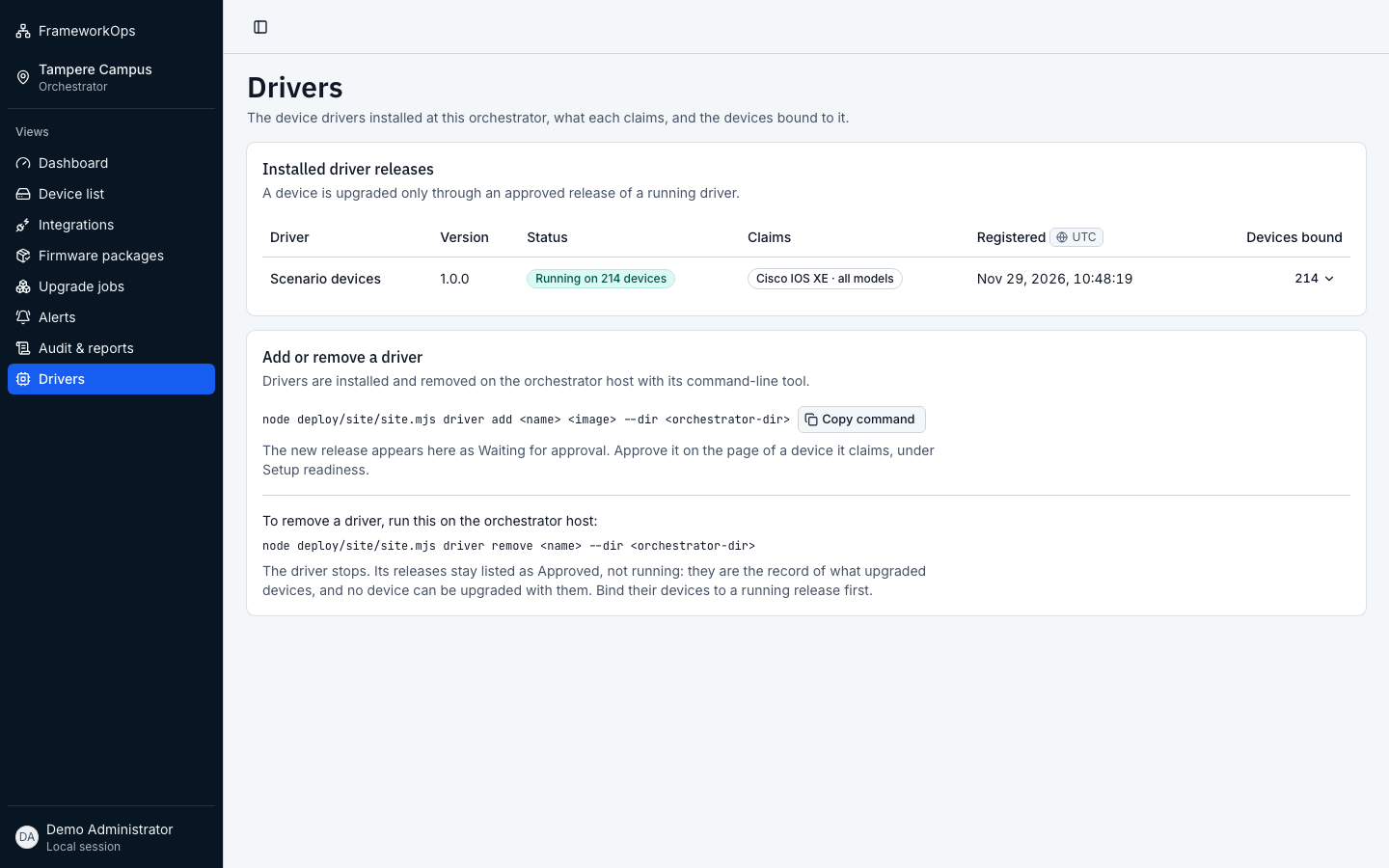
Installed driver releases
"A device is upgraded only through an approved release of a running driver." Releases are sorted by driver name, newest version first.
| Column | What it shows |
|---|---|
| Driver | The driver name |
| Version | The release version, and "added earlier" / "added later" when two registrations share a version |
| Status | The release state (see below), with help text when it needs it |
| Claims | The device families the release declares, as Vendor Platform · model or · all models. Show N more reveals the rest. Claims no device family when it declares none |
| Registered | When the release was registered here |
| Devices bound | How many devices are bound to it. Select the number to open the bound devices |
Release status
| Status | Meaning | What to do |
|---|---|---|
| Running on N devices | Approved, running, and bound to devices | Nothing |
| Approved, running | Approved and running; no device bound yet | Bind it on a device's page |
| Approved, not running (with devices bound) | "This release's driver is not running here, so no device can be upgraded with it. Start the driver, or bind its devices to a running release." | Ask the orchestrator's administrator to start the driver, or bind the devices to another release |
| Approved, not running (no devices) | "… no device is bound to it, so nothing needs doing. A release stays listed after its driver is removed: it is the record of what upgraded devices." | Nothing |
| Waiting for approval | Installed and running, not yet approved | Approve it on the page of a device it claims |
| Superseded | Replaced by another release of the driver | Bind devices to a current release |
| Revoked | Revoked; it cannot be used | Bind devices to another release |
See the devices bound to a release
In Devices bound, select the number.
The row opens. It lists up to a few devices with links to their pages, Show more devices, and Show these devices in the Device list, which opens the Device list filtered on this release.
Select the number again to close the row.
The open row also shows Technical details: Release ID, Driver ID, Declaration digest and Declared claim spellings. Roles that cannot read devices see "Your roles do not include reading devices. Ask an Organization Admin."
In the Device list, the Driver release filter under More filters does the same for any release.
Approve a release and bind it to devices
Approval and binding are done on a device's page, by the Orchestrator administrator or the Integration administrator:
- Open a device the release claims.
- Open Readiness checks.
- Under Device driver, enter the approval reason and select Approve release.
- Choose the release under Driver release and select Check device and save driver.
See Device details.
Add or remove a driver
"Drivers are installed and removed on the orchestrator host with its command-line tool." The Add or remove a driver card shows the command for each, with Copy command. Give it to the person who administers the orchestrator host; you cannot install or remove a driver from the browser.
- After a driver is added, its release appears here as Waiting for approval. Approve it on the page of a device it claims, under Setup readiness.
- After a driver is removed, its releases stay listed as Approved, not running: they are the record of what upgraded devices, and no device can be upgraded with them. Bind their devices to a running release first.
With nothing installed, the page says No driver is installed and shows the add command.
Drivers on the device page
- The header names the bound driver, "Driver:" name version, which opens Drivers.
- With no driver bound, Blockers says "No driver is bound to this device." with the way to choose one.
- Setup readiness shows Driver binding and Driver runtime.
Driver information in Cloud
Cloud has no Drivers view. The Cloud Dashboard's orchestrator table has a Drivers column for each orchestrator:
| Value | Meaning |
|---|---|
| None bound | No driver binding is reported |
| N bindings active | Devices bound to drivers |
| N bindings active · N stale | Some bindings are reported as stale |
| — | Not available to your role, or not reported |
The Dashboard's Upgrade outcomes section lists outcomes per driver, model and version change; see Dashboard. To change anything about drivers, open the orchestrator.
If something goes wrong
If Drivers could not be loaded shows, select Retry. For drivers that are not bound or not running, see Inventory and integrations troubleshooting.