Appearance
Monitoring a running job
After launch, an upgrade job page at the orchestrator shows the rollout as it happens: where it stands in Lab, Canary and Production, what each device is doing, and what you can do next. Use this page to follow a rollout, pause or cancel it, and open one device's upgrade step by step.
Launching is covered in Scheduling and launching. What to do when a rollout stops is in Stops and rollback, and the results of a finished job are in Results and reports.
Open a running job
- At the orchestrator, open Upgrade jobs.
- Open the Active tab (running, paused and stopped jobs) or the Scheduled tab (launched jobs that wait for their start time).
- Select the job.
The job page opens on the Execution tab.
TIP
You can also follow a job from Cloud, read-only. See What Cloud shows of a running job.
Who can do what
| What | Role at the orchestrator |
|---|---|
| Open the job page and follow the rollout | Auditor, Network operator, Orchestrator administrator |
| See the Activity tab's job activity | Roles that can read the audit log: Auditor, Network operator, Orchestrator administrator |
| Pause rollout, Resume rollout, Cancel rollout, Read the device again | Orchestrator administrator |
| Start assisted rollback, Close without rollback | Orchestrator administrator |
If your role can see the job but cannot control it, the header shows "Your role can't control this rollout. Ask an orchestrator operator if it needs action." instead of the buttons. See Roles.
Page layout
The page has one header and four tabs.
| Part | What it shows |
|---|---|
| Header | The job name, its status (for example Running, Paused, Pausing (2 devices finishing)), the device count, the target firmware, and the actions you may take now |
| Notice | One notice under the header that says what is happening and what to do next, for example Auto-stop paused the rollout or Upgrade completed |
| Execution tab | Firmware staging (when the plan has a staging window), Devices by phase, Rollout progress, the Device phases table, and technical details |
| Plan tab | The plan the job runs: strategy and schedule, packages and devices. It cannot be edited after launch |
| Pre-checks tab | The pre-check results the job launched with. "The job launched with these results. Pre-checks no longer run for it." |
| Activity tab | Job activity (who did what and when) and Notifications (how the job's notifications were delivered) |
A launched job's start time cannot be changed. The page says: "The start time of a launched job cannot be changed. To move it, cancel this job and use Plan a new job for these devices."
Rollout progress
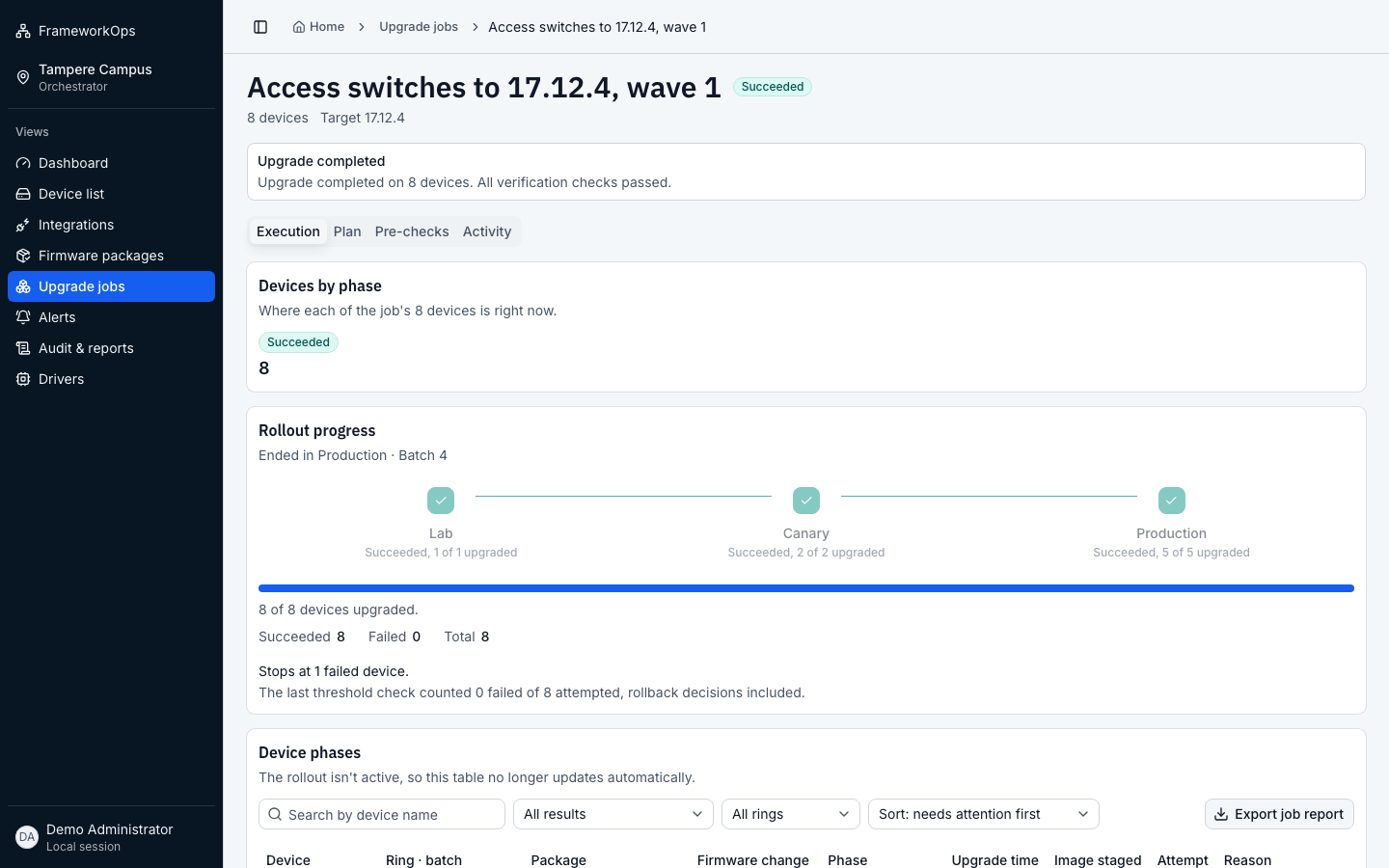
The Rollout progress card shows the whole rollout at a glance.
Position line
The line under the card title says where the rollout stands.
| Text | Meaning |
|---|---|
| "Lab · Batch 1" (ring and batch) | The batch that runs now |
| "Waiting for the first batch" | Launched, no batch has started yet |
| "Paused. Next after resume: Canary · Batch 1" | Paused; the batch that starts when you resume |
| "… No device is left to start" | Paused or stopped with nothing left to run |
| "Ended in Production · Batch 4" | The rollout has ended; the last batch that ran |
| "Ended before the first batch" | Ended before any device started |
| "Stopping before the first batch" | Cancelled or stopped before it started; finishing now |
| "Paused before its start. Resume returns the job to its planned start, {time}" | Paused while it waited for its start time |
| "Paused before its start. Its planned start, {time}, has passed: Resume starts the rollout now" | Paused before its start, and the start time has passed |
| "Stopped: …" | Stopped because a firmware package cannot be used. See Stops and rollback |
Waves
The waves stepper shows Lab, Canary and Production in that order. Each wave shows one state and its counts.
| Wave text | Meaning |
|---|---|
| Not started | The wave has not begun |
| No devices | The plan has no device in this ring |
| "Running, 3 of 8 upgraded" | Devices of this wave are being upgraded |
| "Pausing, 3 of 8 upgraded" / "Pausing, 1 of 8 failed" | A pause was asked for; devices under way finish their step |
| "Paused, 3 of 8 upgraded" / "Paused, 1 of 8 failed" | The rollout is paused in this wave |
| "Stopped, 1 of 8 failed" / "Stopped, 3 of 8 upgraded" | The rollout stopped in this wave (auto-stop or a package that cannot be used) |
| "Continuing with failures (1 of 8)" | Devices failed but stayed under the auto-stop threshold, so the rollout goes on |
| "Rollback in progress (2 of 8)" | Devices of this wave are rolling back |
| "Held for the rollback, 3 of 8 upgraded" | The wave waits while a rollback runs |
| "Cancelling, 3 of 8 upgraded" | The rollout was cancelled; devices under way finish their step |
| "Cancelled, 3 of 8 upgraded" / Cancelled | The rollout was cancelled in or before this wave |
| "Succeeded, 8 of 8 upgraded" | Every device of the wave was upgraded |
| "Failed (1 of 8)" | The wave ended with failed devices |
| "Rolled back (2 of 8)" | Devices of this wave were rolled back |
| Not run | The rollout ended before this wave |
Wait notices
While the rollout waits, a notice under the waves says for what.
| Notice | Meaning |
|---|---|
| "Starts {time} ({relative})." | Launched and scheduled; nothing has started |
| "Starting: the first batch goes out shortly." | The start time has come |
| "Waiting between waves: Canary starts {time} ({relative})." | The plan's wait between waves is running |
| "Canary starts now. The next update shows its first batch." | The wait between waves is over |
| "Pausing: 2 devices are finishing their step. No new device starts." | A pause was asked for |
| "Cancelling: 2 devices are finishing their step. No new device starts." | A cancel was asked for |
| "2 devices are waiting for their driver, which is not running or can't be reached. Each step keeps retrying until its time limit. Start the driver to continue." | A driver is down. See Troubleshooting |
| "The maintenance window ended at {windowEnd}. No new batch starts; devices under way finish their step." | The plan's maintenance window closed during the rollout |
| "The rollout finished {overrun} after its maintenance window ended at {windowEnd}." | The rollout ran past its window |
Progress bar and counters
The Devices finished bar shows Upgraded, Failed and Rolled back devices. Before any device has a result it reads "no device has an outcome yet". Under it, "5 of 12 devices upgraded." and, when it applies, "2 rolling back" or "1 waits for a decision".
The counter row shows how many devices are in each outcome, then Total: Queued, Running, Rolling back, Succeeded, Failed, Rolled back, Rollback failed, Cancelled, Skipped and Not run. A queued device of a stopped job is counted as Not started (job stopped). Outcome meanings are in Statuses.
Auto-stop line
The last lines state the plan's threshold ("Stops at 2 failed devices." or "Auto-stop is off.") and what the last threshold check counted.
| Text | Meaning |
|---|---|
| "No threshold check has run yet." | No batch has finished yet |
| "The last threshold check counted 1 failed of 4 attempted, rollback decisions included." | The count after the last finished batch |
| "… Rolled back since: 1." | Some counted devices have been rolled back since |
| "The rollout was resumed: the count starts anew with the next batch." | After a resume, the count restarts |
| "Since the rollout was resumed, 1 failed of 3 attempted." | The count since the last resume |
| "No threshold check ran in this job." | The job ended before any batch was checked |
Auto-stop is checked after every batch. When the count reaches the threshold, the rollout stops. See Stops and rollback.
Firmware staging
When the plan copies firmware before its maintenance window, a Firmware staging card comes first: "Firmware is copied to the devices from {startsAt} to {endsAt}, before the maintenance window. A device not staged when the window opens is skipped; the others are upgraded."
Each device reads Staged, Transferring, Waiting or Skipped, and the bar shows "3 of 12 devices staged".
Devices by phase
Devices by phase counts where each device is right now ("Where each of the job's 12 devices is right now."), for example Transferring firmware, Verifying firmware, Succeeded. Failed devices that can be rolled back add "2 with rollback available".
The Device phases table
The Device phases table lists every device of the job. It updates by itself: "Updates every 10 seconds while the rollout runs." While a rollback runs it updates every 3 seconds. When the job has ended it says "The rollout isn't active, so this table no longer updates automatically."
| Column | What it shows |
|---|---|
| Device | The device name. Select it to open its upgrade timeline |
| Ring · batch | For example "Canary · Batch 2" |
| Package | Only when the job installs more than one package |
| Firmware change | From which version to which, for example "17.9.5 to 17.12.4"; "Downgrade" when the target is older |
| Phase | The device's phase now, with progress lines under it |
| Upgrade time | From the start of activation to the end of verification. Copying the firmware is not included |
| Image staged | Yes, Not yet, or No |
| Attempt | Which attempt of the upgrade this is |
| Reason | Why the device stopped, failed or did not run, in words. See Reasons |
On narrow screens some columns move under the device name or the phase.
Phases
| Phase | Meaning |
|---|---|
| Queued | Waits for its batch |
| Re-checking pre-conditions | Reading the running firmware and running the pre-checks again before any change |
| Transferring firmware | The firmware is being copied to the device |
| Firmware staged, waiting for the window | Copied; waits for the maintenance window |
| Activating firmware | The new firmware is being activated; the device may restart |
| Waiting for device to come back after reboot | The device restarted and does not answer yet |
| Verifying firmware | The orchestrator checks that the device runs the target firmware |
| Succeeded | Upgraded and verified |
| Failed | The upgrade failed. With "Rollback available" under it, the device waits for a rollback decision |
| Manual action required | Someone must look at the device |
| Outcome unknown, do not retry | The orchestrator cannot tell whether the change took effect |
| Skipped | Not upgraded, for example not staged in time |
| Cancelled | Stopped by a cancellation after it had started |
| Not started (job stopped) | Not started because the job stopped and waits for a decision |
| Not run | The job ended before this device started |
| Rolling back (queued), Rolling back | A rollback is queued or running |
| Rolled back | Back on its previous firmware |
| Rollback blocked | No rollback method fits where the device stands |
| Rollback failed | The rollback did not succeed |
| Rollback outcome unknown, do not retry | The orchestrator cannot tell whether the rollback took effect |
Progress lines under a phase
| Line | Meaning |
|---|---|
| Transfer progress, for example "Transferring firmware", "120 MB of 900 MB", "18 MB/s", "about 40 s left in the transfer" | The driver reports how far the copy has come. Other transfer phases: "Preparing the transfer", "The device is checking the image", "The device is unpacking the image", "Working on the device" |
| "Device not answering yet, still polling · checked 6 times, last 10:42:15" | After a restart the device does not answer yet |
| "Previous firmware still running, waiting for the reload" | The device has not restarted into the new firmware yet |
| "New firmware running, waiting for links to come up" | The new firmware runs; links are still coming up |
| "Verify check could not run, retrying" | A verification read failed and is tried again |
| "Waiting: driver not running or unreachable" | The device's driver does not answer |
| "Inactive package removal queued", "Removing inactive packages", "Inactive packages removed" | Clean-up after a verified upgrade, when the plan asks for it |
| "Inactive package removal failed; remove the packages before the next job" | The clean-up failed; the upgrade itself succeeded |
When clean-up fails on any device, the table shows Inactive package removal failed: "Removal failed on 2 devices. The upgrades succeeded; remove the packages from the pre-check page before the next job on these devices."
Device reasons
The Reason column uses these words. The ones that mean a failure are explained in Troubleshooting.
| Reason | Meaning |
|---|---|
| Waiting for the scheduled start | The job waits for its start time |
| Upgrade service not ready | The orchestrator's upgrade execution is not ready |
| Hardware pilot required | A physical device needs a validated hardware pilot first |
| Plan or approval changed | The plan or its approval changed after launch |
| Maintenance window closed | The maintenance window ended before the device started |
| Maintenance window too short | The device's upgrade does not fit in the window |
| Firmware was not staged before the maintenance window | The copy did not finish in the staging window |
| Failed before any change | The device failed before anything was changed on it |
| Preparation released | The device's preparation was released |
| Transfer not started / Firmware transferred / Firmware transfer failed | Where the copy stopped |
| Activation not started / Firmware activated / Activation failed | Where the activation stopped |
| Device did not come back after reboot | The device did not answer after it restarted |
| Verification not started / Verification passed / Verification failed | Where verification stopped |
| Commit window ended: returned by itself | The device went back to its previous firmware by itself |
| Outcome unknown, do not retry | The orchestrator cannot tell what happened |
| Auto-stop threshold reached | The job stopped at its auto-stop threshold |
| Paused by an operator / Resumed by an operator | An operator paused or resumed the job |
| Rollback started by an operator / Rollback required / Rollback approval changed | Rollback states |
| Rollback failed / Rollback outcome unknown, do not retry | The rollback did not succeed, or its result is unknown |
| Rollback declined / Rollback declined by {name}: | The job was closed without rollback |
| Cancelled / Cancelled before it started | The job was cancelled |
| Firmware package not usable | The device's package cannot be used any more |
| Not started: the job auto-stopped | The job stopped before this device's batch |
| Not started: {packages} / Stopped before its upgrade: | A package of the job cannot be used |
| Not started: the job stopped because | Another package of the job cannot be used |
| Another firmware package of the job is not usable | Another package of the job cannot be used |
| Not started: the job was closed without rollback | The job was closed before this device started |
| "{reason}, then rolled back" | The device failed and was then rolled back |
Search, filter and sort
Above the table:
- Search by device name.
- Filter by result: All results or one outcome, with its count, for example "Failed (2)".
- Filter by ring: All rings, Lab, Canary or Production.
- Sort devices: Sort: needs attention first (default), Sort: rollout order, Sort: device name, Sort: phase, Sort: last change first.
- Clear filters removes the search and filters.
- Export job report downloads every device, whatever the filters. See Results and reports.
When nothing matches, the table says No devices match. The table shows a page of devices at a time; use Show more devices to load more, and Refresh devices to read them again now.
A device's upgrade timeline
The timeline shows every step of one device's upgrade.
In the Device phases table, select the device name.
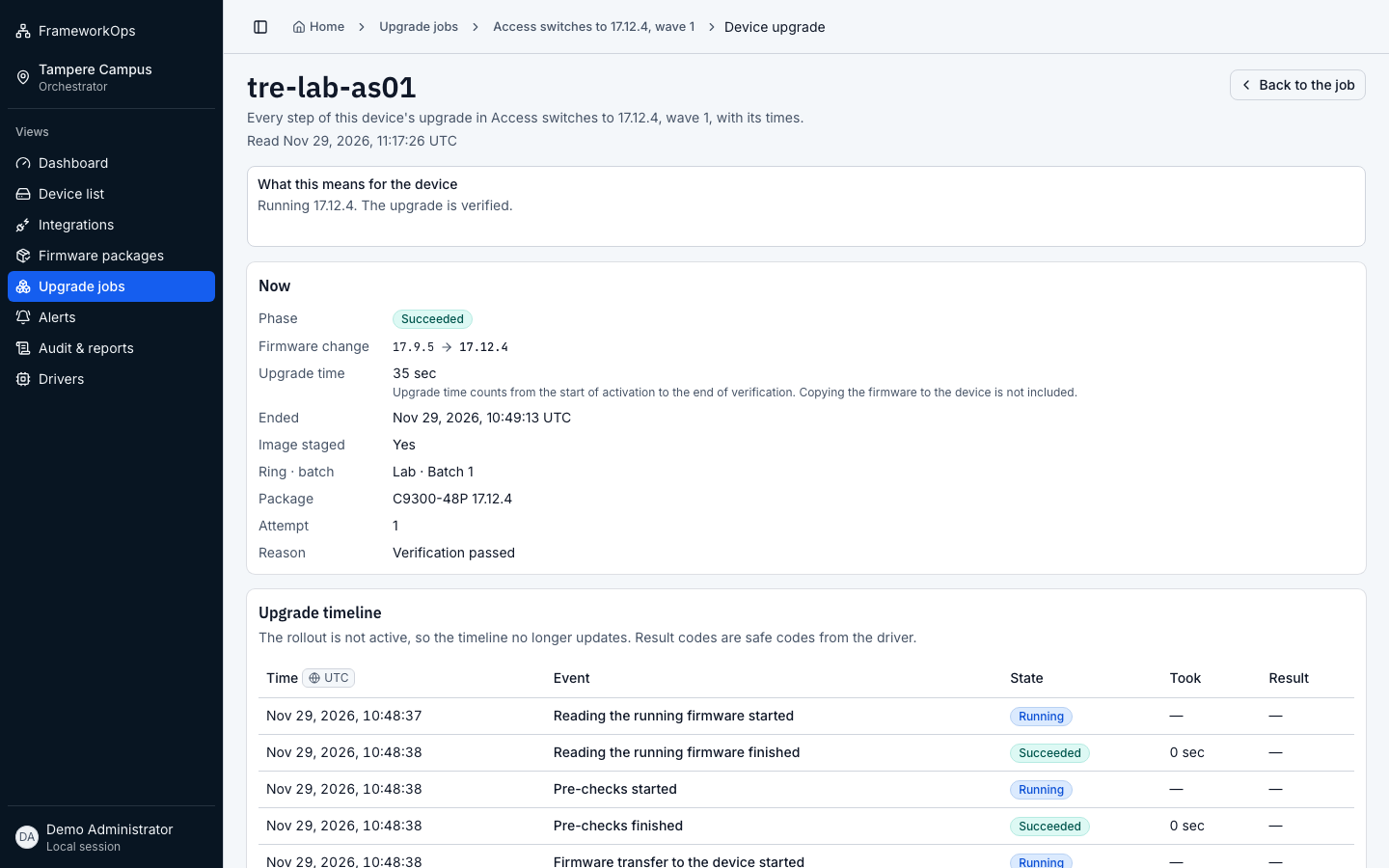
The Upgrade timeline opens: "Every step of this device's upgrade in {job}, with its times."
To return, select Back to the job.
Now
The Now card shows where the device stands.
| Row | What it shows |
|---|---|
| Phase | The device's phase |
| Firmware change | From which version to which |
| Current step | The step under way, with transfer progress, "Running for 4 min", "usually about 3 min here", "allowed up to 20 min", or "Taking longer than usual; the time budget ends {time}." While a step is retried: "Attempt 2, last answer from the driver: …" |
| Upgrade time | From activation to the end of verification |
| In this phase since / Ended | When the phase began, or when the upgrade ended |
| Rolled back / Returned by itself | When the device went back to its previous firmware |
| How it was rolled back | The rollback method, for example "the previous firmware is installed again" |
What this means for the device
When a device stopped, failed, or waits for its driver, a notice explains what it runs now and what you can do.
| Text | Meaning |
|---|---|
| "Running {version}. The upgrade is verified." | Succeeded |
| "Still on {from}. Nothing was changed on the device." | Failed before any change. "Fix the cause, then plan a new upgrade job for the device. Resuming the rollout does not retry it." |
| "Running the new firmware {to}. Activation is final on this device." | The new firmware is active and permanent |
| "Running {to}, not committed. It returns to {from} by itself at {time} ({remaining}) unless it is committed." | The new firmware runs but is not permanent; the device returns by itself when its commit window ends |
| "Running {to}, not committed. It stays on {to} when the commit window ends." | The new firmware runs, not committed, and the device does not return by itself |
| "{to} was activated but verification failed, so what the device runs is not confirmed. …" | Verification failed after activation |
| "Returning to {from}: {method}." | A rollback runs |
| "Back on {version}. The upgrade to {to} was rolled back." | Rolled back |
| "Back on {from}: the device undid the activation itself. The upgrade to {to} did not take." | The device went back by itself during activation |
| "The rollback failed. The device may still run {to}. Check the device before any other action." | Rollback failed |
| "No rollback fits where the device stands: its driver has no method for it. Check the device and return it by hand if needed." | Rollback blocked |
| "The orchestrator can't tell whether the device runs {from} or {to}. Check the device before any other action; do not retry." | Outcome unknown |
| "Waiting for this device's driver, which is not running or can't be reached. The step keeps retrying until its time limit." | Driver down. "Start the driver on this orchestrator and the step continues by itself. If its time limit passes first, the device is reported for review." |
When the device can be rolled back, the notice is titled Rollback available and has Go to the job's rollback. After a commit window ended, Read the device again asks the orchestrator to read what the device runs; nothing is changed on the device.
Steps
The steps table lists each event with Time, Event, State, Took and Result.
| Step | What it does |
|---|---|
| Reading the running firmware | Reads what the device runs before any change |
| Pre-checks | Runs the pre-checks again on the device |
| Firmware transfer to the device | Copies the firmware |
| Activation and reboot | Activates the new firmware; the device may restart |
| Verification | Checks that the device runs the target firmware |
| Commit | Makes the new firmware permanent, when the driver has this step |
| Clean-up of inactive packages | Removes old packages, when the plan asks for it |
| Rollback | Returns the device to its previous firmware |
Events read "{step} started", "{step} finished", "{step} failed", "{step} cancelled" and "{step}: outcome unknown". States are Running, Succeeded, Failed, Cancelled, Outcome unknown and Still to come. A step may also show "Staging window", "Time budget ends {time}" and "Sent 3 times".
The Result column shows what happened in words, then the driver's safe code. "Result codes are safe codes from the driver; device output is never shown." Step results are listed in Troubleshooting.
While the rollout runs, the timeline updates every 10 seconds. If the device has no steps yet: No step yet, "The device's steps are created when its batch, or the staging window, starts."
Operator actions
The actions appear in the header only when the job allows them now and your role may use them.
| Action | When it appears | Reason | Passkey |
|---|---|---|---|
| Pause rollout | The rollout is running | Required | No |
| Resume rollout | The rollout is paused or auto-stopped, no device is still finishing a step, and devices are left to start | Required | Yes |
| Cancel rollout | The job is scheduled, running, paused or stopped | Required | No |
| Start assisted rollback | Devices failed after activation and wait for a rollback decision, and the rollout is paused, stopped, cancelled or ended | Required | Yes |
| Close without rollback | The same as Start assisted rollback, while no device is in a step | Required | Yes |
There is no action to skip a single device. A device that should not be upgraded must stay out of the plan; see Planning an upgrade.
Every confirmation has a Reason (required) field: "Recorded with this action in the audit log." The confirm button stays off until the reason is valid. If you close a dialog with a typed reason, the page asks before throwing it away.
Pause the rollout
Select Pause rollout.
The dialog Pause the rollout? says: "Devices with an upgrade step in progress (2) finish that step before the rollout stops. Queued devices (6) don't start until the rollout is resumed."
Type the reason.
Select Pause rollout. To leave it running, select Keep rollout running.
The job reads Pausing (2 devices finishing) until the devices under way finish, then Paused. The notice reads Rollout paused: "Paused by {name} at {time}. Resume or cancel the rollout." If no device is left to start, it says the rollout can only be cancelled.
Resume the rollout
Select Resume rollout.
The dialog Resume the rollout? says: "Queued devices (6) continue in Lab → Canary → Production order, and auto-stop is checked after every batch. You confirm with your passkey next."
Read any warning. If devices failed: "1 device failed in this rollout. Resuming doesn't repair or roll it back: it stays as it is while the next batches start. Roll it back first if it shouldn't stay."
Type the reason and select Resume rollout. To stay paused, select Keep rollout paused.
Confirm with your passkey.
If the job was stopped before its start (for example because its package had to be approved again), resuming returns it to its planned start ("The job goes back to waiting for its planned start, {time}. No device starts now.") and the page shows The job is scheduled again. If the planned start has passed, resuming starts the rollout now and the page shows Rollout started.
Resume rollout is not offered while the rollout is still pausing or cancelling.
Cancel the rollout
Select Cancel rollout.
The dialog Cancel the rollout? says: "Queued devices (6) won't be upgraded. Devices with a step in progress (2) finish that step first. Devices already upgraded (4) keep the new firmware. A cancelled rollout can't be resumed."
Type the reason.
Select Cancel rollout. To keep the job as it is, select the other button: Keep rollout running, Keep rollout paused, Keep rollout scheduled, Keep rollout stopped or Keep the job open, depending on the job's state.
WARNING
A cancelled rollout cannot be resumed. Devices already upgraded keep the new firmware; cancelling rolls nothing back.
While devices finish their step, the notice reads Cancelling the rollout: "No more devices start. 2 devices are finishing the step they are on. This page keeps updating; don't work on those devices until they have ended." When devices still wait for a rollback decision, the job is marked Cancelled but stays open until each is rolled back or the job is closed without rollback.
Roll back or close without rollback
These are described in Stops and rollback.
If your action does not go through
The page re-reads the job while a confirmation is open. If the job moved on before your action arrived, nothing is done and the page explains why, for example:
- "The rollout was already paused. The page now shows the current state."
- "The rollout is already being cancelled: the devices under way are finishing their step, so nothing was done. The page now shows the current state."
- "The job changed before your action reached it, so nothing was done. The page now shows the current state."
- "The last action is still being sent. Wait for the page to update."
If the passkey check is cancelled or fails, the dialog stays open with Nothing was changed and "The passkey check was cancelled. Confirm again to try once more." or "The passkey check did not pass. Confirm again to try once more."
Job activity
The Activity tab lists the job's history: "Who approved, launched, paused, resumed or cancelled the job, which batches went out, and what stopped it. Every device step stays in the audit log."
The table has Time, Event, By and Reason. Events the orchestrator records itself show Orchestrator in By. Examples of events:
- Execution approved, Rollout launched, Rollout started
- "Batch 2 released (3 devices)"
- "Auto-stop threshold met: 2 failed devices"
- Rollout paused, Rollout resumed, Rollout cancelled, Rollback started, Closed without rollback
- "Rollout ended: Succeeded (12 upgraded, 0 not)"
Routine events are folded; select Show 4 routine events to see them. A Devices now: line sums the devices' current outcomes.
Under it, Notifications lists the job's notification deliveries with Event, Channel, Status (Pending, Sending, Retrying, Delivered, Failed, Cancelled) and Time. An in-app notification that asks for attention has Acknowledge. Set up channels opens the channel status for this orchestrator.
What continues when you close the browser
The rollout runs at the orchestrator, not in your browser. Closing the tab, signing out or losing your connection does not pause, cancel or slow it. Batches, auto-stop checks and automatic rollbacks go on. Open the job page again to see where it stands.
Loading the job page never starts or changes an upgrade. If the page cannot refresh, it says The page could not refresh: "What you see is from the last successful read. The page tries again by itself." If only the rollout status loads, the page shows Rollout status shown read-only: "The rollout status still loaded. Retry to restore pause, resume, cancel, and rollback."
What does stop while no browser is open is Cloud's copy of the job: sync between the orchestrator and Cloud runs through a signed-in Cloud browser tab. See Orchestrator connection.
What Cloud shows of a running job
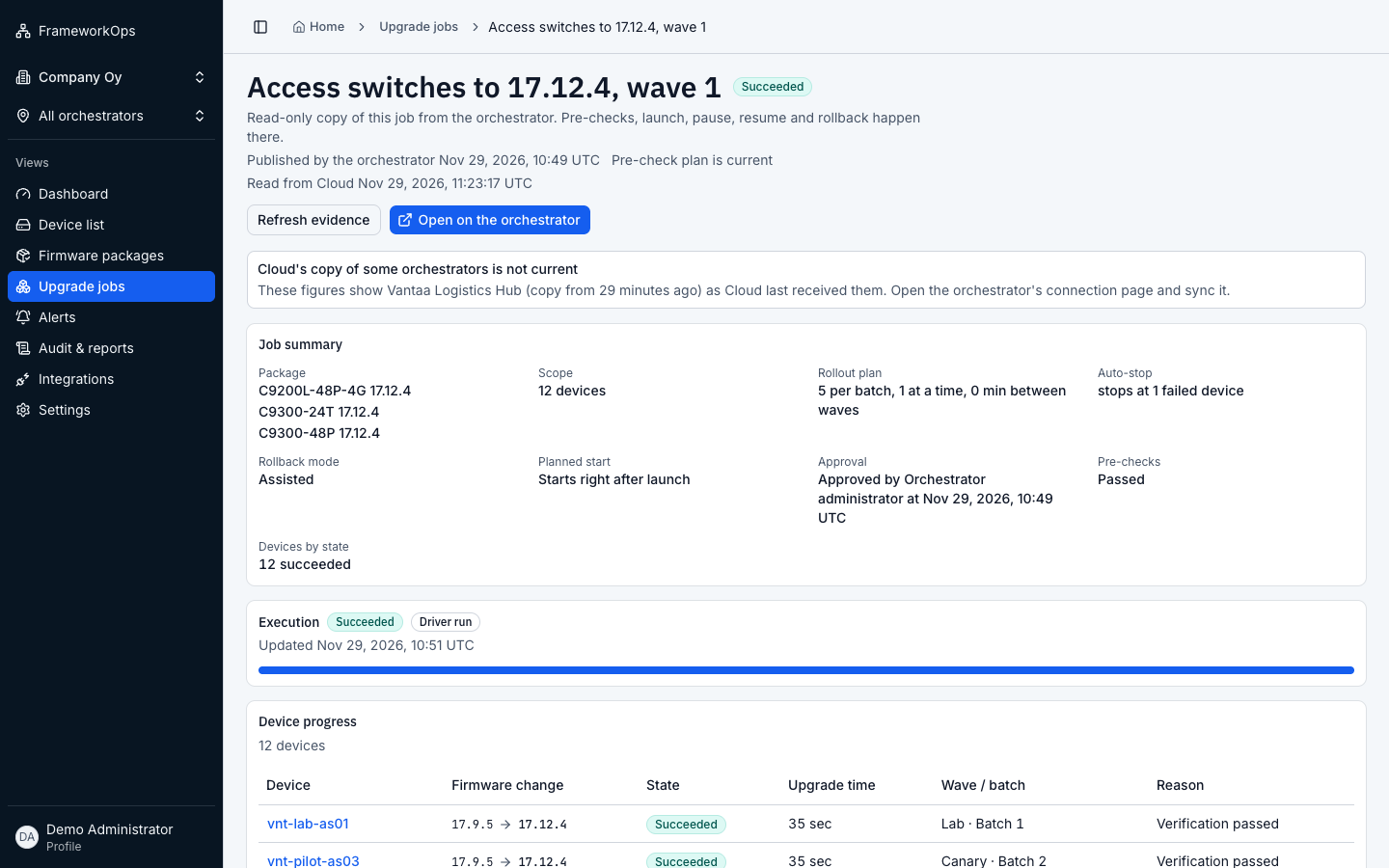
In Cloud, open Upgrade jobs and select the job. Cloud shows a read-only copy: "Read-only copy of this job from the orchestrator. Pre-checks, launch, pause, resume and rollback happen there."
| Part | What it shows |
|---|---|
| Header | The job's status, "Published by the orchestrator {time}", Refresh evidence, and Open on the orchestrator |
| Job summary | Package, scope, rollout plan, auto-stop, rollback mode, planned start, approval, pre-checks and Devices by state (for example "4 succeeded", "1 failed (1 with rollback available)", "6 queued") |
| Execution | The rollout status, how it was run (Driver run, VIRTUAL NETWORK DEVICE or SIMULATED), "Updated {time}", and the Execution completion bar |
| Device progress | Each device with Device, Firmware change, State, Upgrade time, Wave / batch and Reason, in the orchestrator's words. Load more devices loads the next page |
| Pre-check run history | The pre-check runs of the job |
Cloud re-reads its copy every few seconds while the rollout is active, but its copy changes only when the orchestrator's data reaches Cloud through sync. To act on the job, select Open on the orchestrator. If Cloud's copy is behind, it says "Cloud's copy of some orchestrators is not current". See Results and reports.
If something goes wrong
- The rollout stopped or waits for a decision: Stops and rollback.
- A device failed, a driver is down, or the job does not move: Troubleshooting: Upgrades and rollback.
- Cloud shows an old state: Troubleshooting: Upgrades and rollback.