Appearance
Stops and rollback
A rollout stops by itself when too many devices fail, and you can stop it by hand. When it stops with failed devices, the orchestrator asks you to decide what happens to them: roll them back, leave them as they are, go on, or cancel. This page explains each stop, each decision and each rollback outcome.
All of this happens on the job page at the orchestrator. Following a rollout is covered in Monitoring a running job.
Who can decide
| Action | Role at the orchestrator | Passkey |
|---|---|---|
| Pause rollout, Cancel rollout | Orchestrator administrator | No |
| Resume rollout | Orchestrator administrator | Yes |
| Start assisted rollback, Close without rollback | Orchestrator administrator | Yes |
| Read the device again (after a commit window) | Orchestrator administrator | No |
Every action asks for a Reason (required), which is recorded in the audit log.
How the plan decides what happens on a failure
Two settings of the plan decide what the orchestrator does when devices fail. You see them on the job's Plan tab under Strategy & schedule.
| Setting | Value | What it means |
|---|---|---|
| Auto-stop | "2 failed devices", "10% of devices impacted", both joined with "or", or off | When the count reaches the threshold after a batch, the rollout stops |
| Rollback | Manual | "Manual: the job starts no rollback. A device that fails stays as it is, and you return it with your own tools." |
| Assisted | "Assisted: a device that fails after its activation waits for you, and you start its rollback from the job page." | |
| Automatic | "Automatic: a device that fails after its activation is rolled back at once. Available for batches up to 100 devices." |
A device that fails before its new firmware was activated has nothing to roll back: it still runs what it ran before.
Auto-stop
Auto-stop is checked after every batch. The check counts the failed devices of the attempted ones, devices that wait for a rollback decision included. When the count reaches the plan's threshold, no new batch starts. Devices of the batch that are still under way finish their step.
The Rollout progress card shows the threshold ("Stops at 2 failed devices.") and the last count ("The last threshold check counted 2 failed of 5 attempted, rollback decisions included.").
When auto-stop stops the rollout:
- The job status reads Auto-stopped, or Rollback decision needed when failed devices can still be rolled back.
- The notice reads Auto-stop paused the rollout, with one of these texts:
- "2 devices failed and reached the auto-stop threshold. Review the failed devices below, then choose what happens next."
- "2 devices failed and reached the auto-stop threshold. 1 of them can still be rolled back and waits for your decision. Choose what happens next."
- "The 2 devices that reached the auto-stop threshold are now rolled back. Choose what happens next."
- "2 devices reached the auto-stop threshold. Rolled back since: 1. Still failed: 1. Review the failed devices below, then choose what happens next."
- Queued devices read Not started (job stopped), with the reason "Not started: the job auto-stopped".
- Activity records "Auto-stop threshold met: 2 failed devices", or "Rollout stopped: rollback decision needed (auto-stop threshold met: 2 failed devices)".
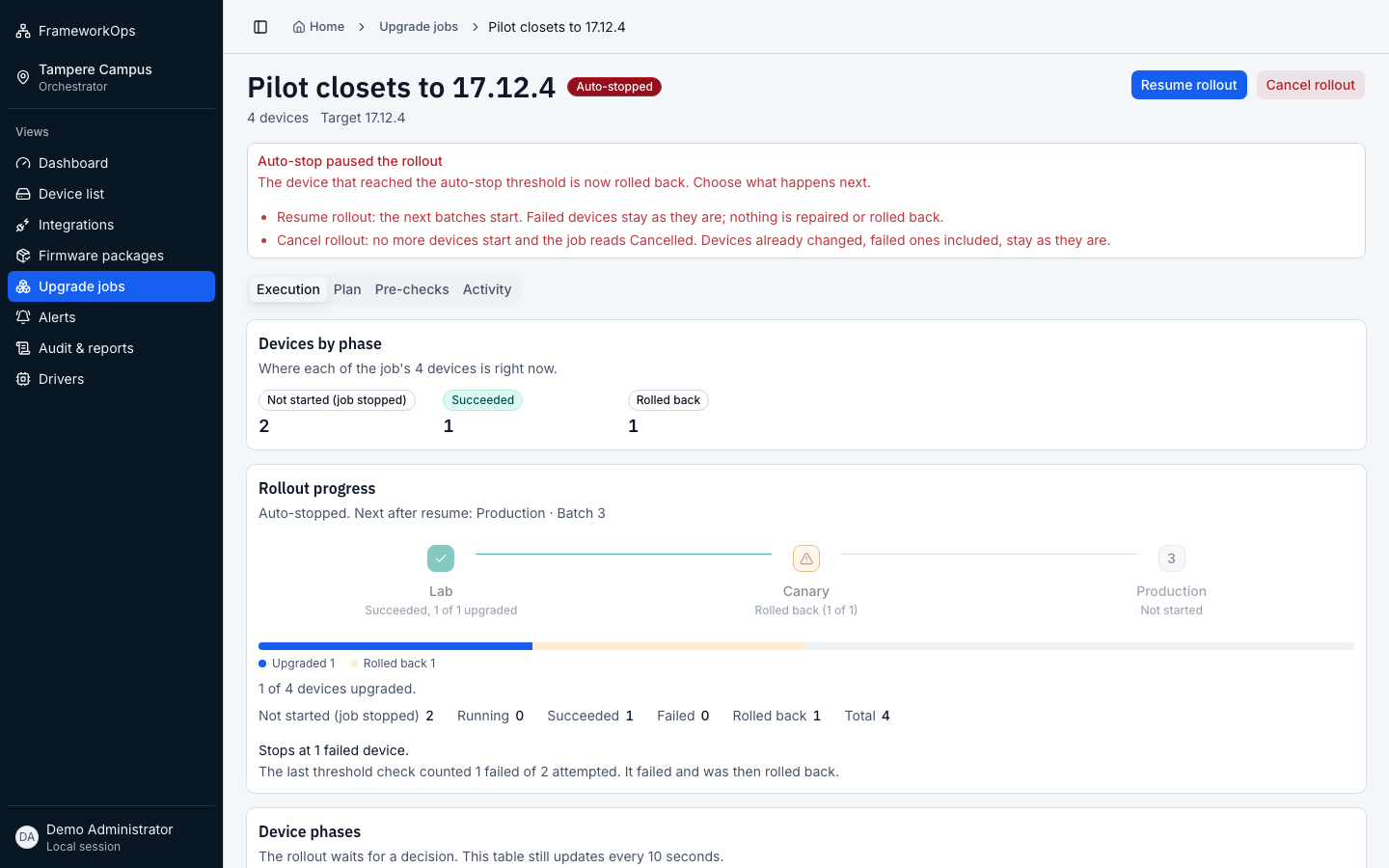
Under the notice, the page lists only the choices the job offers now. Then decide, as described in Decide what happens next.
In a job with Automatic rollback, reaching the threshold can roll the failed devices back by itself. See Automatic rollback.
A device fails below the threshold
In a job with Assisted rollback, a device that fails after activation reads Failed with "Rollback available" under it. If the threshold is not reached, the rollout goes on and the wave reads "Continuing with failures (1 of 8)".
The notice says 1 device waits for a rollback decision: "1 failed device can be rolled back after you pause the rollout." To roll it back now:
- Select Pause rollout and confirm with a reason.
- Wait until the job reads Paused. Rollback decisions are not offered while devices are still finishing a step.
- Select Start assisted rollback. See Roll devices back.
You can also let the rollout finish and decide afterwards: a job that ends with devices waiting for a decision stays open until each is decided.
Decide what happens next
A stopped job with failed devices offers up to four ways on. The notice lists the ones that apply.
| Choice | What happens |
|---|---|
| Resume rollout | "Resume rollout: the next batches start. Failed devices stay as they are; nothing is repaired or rolled back." |
| Cancel rollout | "Cancel rollout: no more devices start and the job reads Cancelled. Devices already changed, failed ones included, stay as they are." With devices still waiting: "the devices that have not started never will, and the job is marked Cancelled. It stays open until each waiting device is rolled back or the job is closed without rollback." |
| Start assisted rollback | "Start assisted rollback: the devices you choose return to the firmware they ran before, and may restart. Other devices are not touched." |
| Close without rollback | "Close without rollback: the failed devices stay as they are and the job closes as Failed." |
WARNING
Resuming does not repair or roll back failed devices. The dialog warns: "1 device failed in this rollout. Resuming doesn't repair or roll it back: it stays as it is while the next batches start. Roll it back first if it shouldn't stay."
After a resume, the auto-stop count starts again: "The rollout was resumed: the count starts anew with the next batch." How to resume and cancel is in Monitoring a running job.
Roll devices back
Assisted rollback returns the devices you choose to the firmware they ran before.
On the job page, select Start assisted rollback.
The dialog Choose devices to roll back opens: "These devices failed after activation and wait for your decision. Their status is checked again before you confirm."
Select the devices. The table shows Device, Ring and batch, Firmware change, Upgrade time and Why it failed. Use the header checkbox to select all, and Load more devices if not all are listed. "2 of 3 devices selected. One rollback takes up to 100 devices."
Type the reason: "Why do these devices need a rollback? Recorded in the audit log."
Select Review rollback.
The dialog Roll back the selected devices? says what happens to each device, for example:
- "{device} returns to 17.9.5: the new firmware is not made permanent. It does not restart; …"
- "{device} returns to 17.9.5: the previous firmware is installed again. The device restarts and is unavailable meanwhile; …"
When the rollback closes the job: "This closes the job: the 2 devices that have not started will not run. Plan a new job for them afterwards."
Select Roll back 2 devices. To change the selection, select Back to selection.
Confirm with your passkey.
The notice reads Rollback in progress: "Devices are returning to their previous firmware and may restart. Follow each device below; this page updates every 3 seconds." Each device reads Rolling back (queued), then Rolling back.
WARNING
A rollback can restart the device. Plan it for a time when the device may be unavailable.
If the devices changed before you confirmed: "The devices changed before you confirmed, so nothing was done. The list now shows the current state."
When the button is unavailable
| Text | Meaning |
|---|---|
| "Not available yet: the commit window of 2 devices has ended and the orchestrator is reading what they run. They may already be back on their previous firmware." | Wait for the read to finish |
| "Commit window ended. It can be chosen once the orchestrator has read what it runs." | One row in the dialog cannot be chosen yet |
| "Reading the devices that wait for a decision…" | The list is loading |
| "Select at least one device to roll back." | No device is selected |
| Rollback isn't ready / "The devices could not be read. Close this dialog and try again." | The list could not be read |
Rollback outcomes
| Device phase | Meaning | What to do |
|---|---|---|
| Rolled back | "Back on {version}. The upgrade to {to} was rolled back." | Plan the device again when ready |
| Rollback failed | "The rollback failed. The device may still run {to}. Check the device before any other action." | Check the device directly |
| Rollback blocked | "No rollback fits where the device stands: its driver has no method for it. Check the device and return it by hand if needed." | Return it with your own tools if needed |
| Rollback outcome unknown, do not retry | The orchestrator cannot tell whether the rollback took effect | Check the device and the activity before any action |
When a rollback fails or its outcome is unknown, the notice reads Rollback needs attention: "A rollback failed or its outcome is unknown. Open the affected device to see what it runs, check the device itself, and don't take another action until it is clear."
When the rollback finishes, Activity records "Rollback finished: 2 devices are back on their previous firmware", or "Rollback finished: 1 back on its previous firmware, 1 not returned".
How the job ends:
| Job status | Notice |
|---|---|
| Rolled back | Rolled back: "{devices} were rolled back and are back on their previous firmware." |
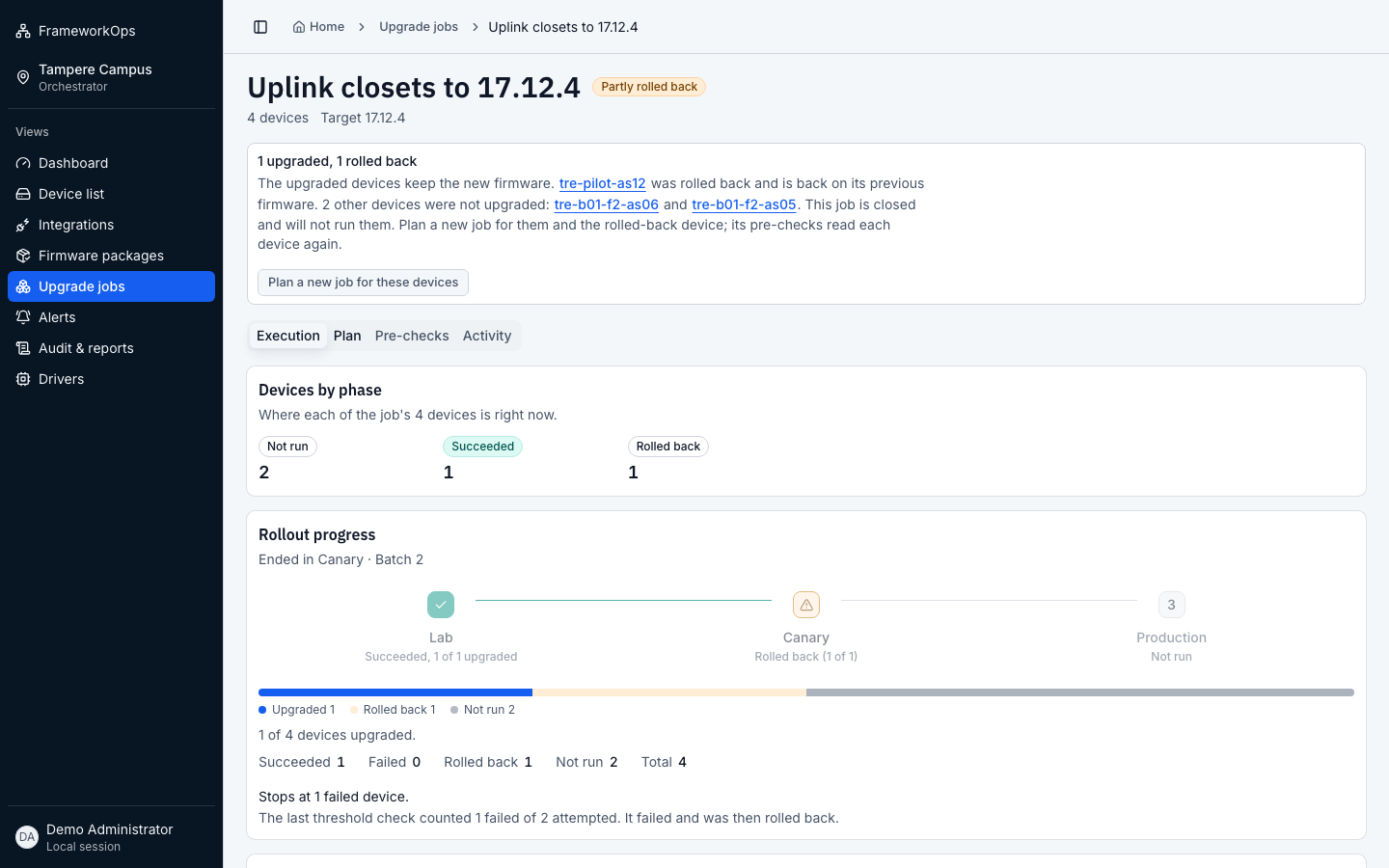
| Partly rolled back | The title gives the counts, for example "4 upgraded, 1 rolled back". "The upgraded devices keep the new firmware." |
| Failed | Upgrade finished with failures, with "Rolled back: 1." when some were rolled back |
Automatic rollback
In a job with Automatic rollback, the orchestrator rolls back a device that fails after activation without asking. Nobody chooses the devices, and no passkey is asked.
Activity records it, for example "Automatic rollback started: 1 failed device was returned to its previous firmware, under the auto-stop threshold (the previous firmware is installed again)." or "Automatic rollback started: 2 failed devices reached the auto-stop threshold. The orchestrator returned 2 devices to their previous firmware (…)."
The closed job's notice reads Rolled back automatically, for example "This job rolls back by itself: 2 failed devices reached the auto-stop threshold, and the orchestrator returned {devices} to their previous firmware."
The job report's Rolled back by column reads "Orchestrator (automatic rollback)".
Manual rollback
In a job with Manual rollback, the orchestrator starts no rollback and the page offers none. The notice adds: "Rollback is manual in this job: the orchestrator starts none and offers no rollback here. A device with an uncommitted image returns by itself at the time on its row, when its driver declares that. Return any other device with your own tooling, then plan a new job for it."
Commit windows and devices that return by themselves
Some devices run new firmware "not committed" for a while. If the firmware is not made permanent before the commit window ends, the device returns to its previous firmware by itself. The device's timeline says so: "Running {to}, not committed. It returns to {from} by itself at {time} ({remaining}) unless it is committed."
While such a device runs uncommitted firmware, a new upgrade job cannot take it.
After the window ends, the orchestrator reads the device. Until that read is in, the Execution tab shows "1 device: commit window ended, state not confirmed" ("The orchestrator reads what the device runs. Nothing is sent that changes it."). To ask for the read now:
- Select Read the device again (or Read 2 devices again).
The result appears on the device and in Activity:
| Result | Meaning |
|---|---|
| "Commit window ended: the device returned to its previous firmware by itself" | The device reads Rolled back, reason "Commit window ended: returned by itself" |
| "Commit window ended: the device still runs the uncommitted firmware" | It did not return by itself |
| "Commit window ended: the device reports the firmware as committed" | It was committed outside this job |
| "Commit window ended: the device could not be read" | What it runs is unknown |
The job report's Rolled back by column reads "Device itself (commit window ended)".
Close a job without rollback
Close the job without rollback when the failed devices may stay as they are.
Select Close without rollback.
The dialog Close the job without rolling back? says: "The failed device that waits for a rollback decision stays as it is and the job closes as Failed. No rollback starts."
Read what happens to each device:
- "{device} returns to {version} by itself at {time} unless its new firmware is made permanent."
- "{device} returns to {version} by itself at {time} unless its new firmware is made permanent. Until then new jobs are blocked for it."
- "{device} runs its new firmware uncommitted until {time}. Until then new jobs are blocked for it."
- "The 2 devices that have not started will not run. Plan a new job for them afterwards."
Type the reason: "Why is no rollback needed? Recorded in the audit log."
Select Close without rollback. To go back, select Keep the job open.
Confirm with your passkey.
The job status reads Failed, with the note Closed without rollback where a status shows its note (for example in the job list). The notice reads Closed without rollback: "Rollback declined by {name}: {reason}". Failed devices show the reason "Rollback declined by {name}: {reason}", and devices that never started show "Not started: the job was closed without rollback".
If every device left as it was later returns by itself, the note reads "Closed without rollback; no device is failed now" and the notice says: "Every device left as it was has since returned to its previous firmware by itself, so no device is failed now. The job stays Failed by that decision."
A firmware package can no longer be used
If a package of the job is revoked, rejected, sent back for approval, or can no longer be installed while the job is open, no further device of the job starts. Devices already activating finish their upgrade or roll back as usual. The job status reads Stopped with a note: Package revoked, Package rejected, Package not approved or Package not usable.
| Notice title | What it says | What to do |
|---|---|---|
| Firmware package revoked / Firmware package can no longer be used | The rollout will not start, or no further device starts, or the rollout cannot resume | Cancel this job and plan a new one with another package |
| Firmware package rejected | The same, for a rejected package | Cancel this job and plan a new one with another package |
| Firmware package waits for approval again | The package's compatibility changed and it must be approved again | Approve the package again, then Resume rollout; or cancel the job |
The notice links to the package ("Open {package} to approve it again"). When the package is approved again, the notice reads "{package} was approved again. Resume to continue." and Activity records "{package} was approved again; the rollout is paused". Approval is covered in Approving and revoking.
If devices also wait for a rollback decision, make that decision first: "Make the rollback decision first: roll the waiting devices back, or close the job without rollback."
If you try to resume while the package cannot be used: "A firmware package of this job cannot be used, so the rollout did not resume. The notice above says what happens now."
Other stops
| Notice | Meaning | What to do |
|---|---|---|
| Rollout paused | An operator paused the rollout | Resume or cancel it |
| Rollout cancelled | An operator cancelled the rollout. "Devices that finished before the cancellation (4) keep the new firmware." | Plan a new job for the devices not upgraded |
| Cancelled before the first batch | "The rollout was cancelled before any device started. Nothing on the devices was changed." | Plan a new job if needed |
| No device was upgraded | "The firmware was not staged on any device before the maintenance window opened, so the rollout changed nothing. Run the pre-checks and start a new job with a longer staging window." | Plan a new job with a longer staging window |
| Maintenance window ended | "The maintenance window ended at {windowEnd}. No new batch starts; devices under way finish their step." | Plan a new job for the devices left |
| Start needs reconciliation | "The orchestrator can't confirm whether the rollout started. An orchestrator operator must check the devices and the audit log before any further action. Do not retry the launch." Status Needs reconciliation | Check the devices and the audit log |
| Rollout start conflict | "The recorded start conflicts with what the orchestrator observed. An orchestrator operator must investigate the audit log before creating another rollout." | Investigate the audit log |
| Upgrades are turned off at this orchestrator | "An orchestrator administrator must turn upgrade execution back on before the rollout can be launched or resumed." | Ask an orchestrator administrator |
| Physical hardware pilot required | "At least one selected physical device needs a validated hardware pilot for this rollout. Ask an orchestrator administrator to validate the pilot for that device." | Ask an orchestrator administrator |
After the job closes
A closed job never runs again. When it did not upgrade every device, its notice says how many and offers Plan a new job for these devices. See Results and reports.
If something goes wrong
See Troubleshooting: Upgrades and rollback for auto-stopped jobs, failed rollbacks, and rollbacks that are not available.